Apple Watch Quick Start
Apple Watch is useful when reaching for your iPhone would interrupt the moment. The Watch app is included with the iPhone app and does not require a separate purchase.
Install on Apple Watch
Section titled “Install on Apple Watch”- Install and open Knoself on iPhone first.
- Open the iPhone Watch app.
- Find Knoself in available apps and confirm it is installed.
- Open Knoself on Apple Watch and allow the initial state to sync.
Start and Manage a Timer
Section titled “Start and Manage a Timer”- Start a general timer from the Watch home page.
- Open Quick Start and tap a frequent tag.
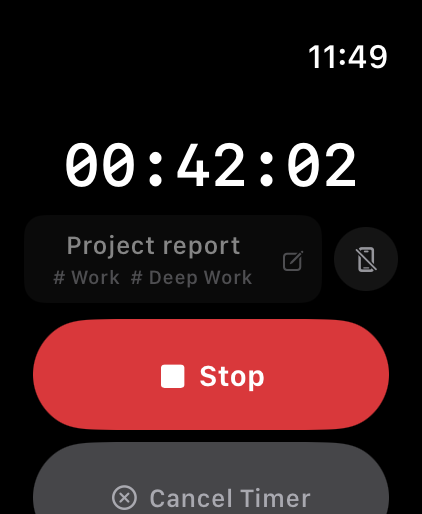
- While timing, see the activity name, tags, and elapsed time.
- Tap Finish to save it, or Cancel Timer when it should be discarded.
Configure Watch Shortcuts
Section titled “Configure Watch Shortcuts”Apple Watch displays one 2×2 shortcut group at a time:
- On iPhone, open Knoself Settings → Home Screen Widgets.
- Create a shortcut group with up to four frequent tags.
- Open Apple Watch Quick Start in Settings.
- Select the group shown on the Watch’s second page.
If Status Does Not Sync
Section titled “If Status Does Not Sync”Confirm iPhone and Apple Watch are connected, then open Knoself once on both devices. After changing a shortcut group, wait briefly and reopen the Watch app. Avoid starting repeatedly from several entry points before the current timer state is confirmed.